AI reply drafts
Replies drafted from your own help articles. You check and send.
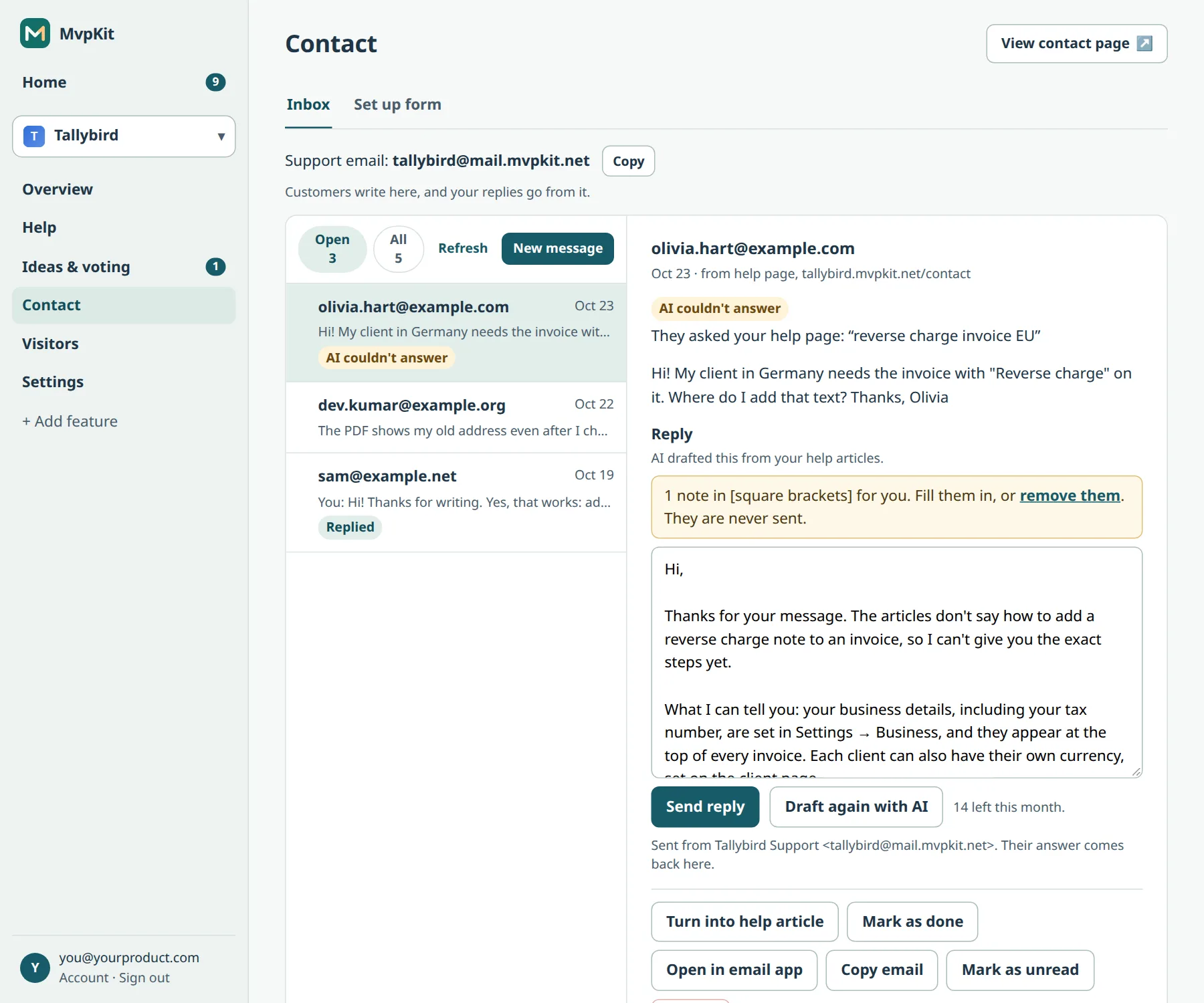
Press Draft with AI on a message and MvpKit writes a reply from your published help articles. Where the articles don’t say, it leaves a note in [square brackets] for you instead of guessing. You fill it in, edit what you like, and send.
Free for one project. Every plan includes help, contact form, support email, ideas with voting and waitlist. Pro's published price is $29/month total for up to five projects; Studio is $79/month for up to 20.
Launch offer: sign up before January 1, 2027 to keep the founding price (Pro $15/month, Studio $39/month) once billing starts. Until then, paid-plan features are temporarily free, with no card. We will email at least 30 days before charging. See plans and limits.
Two ways to get a draft
- From your help articles
- Leave the reply box empty and press Draft with AI. The draft uses only your project's published articles.
- From a few words of yours
- Type the facts, like "yes, a refund is fine, takes 3 days", then press Draft from my text. AI turns them into a friendly email and uses your articles for the details.
Notes, not guesses
When something only you can know is missing, like an order number or a date, the draft marks it in [square brackets]. Notes are never sent: MvpKit asks you to fill them in or remove them before the reply goes out.
You stay in charge
- Nothing is sent until you press Send reply.
- Draft again if you don't like the first one.
- Text is checked against our content rules before it is drafted or sent.
Limits
AI is included, not billed per draft. Free accounts get 20 reply drafts a month, Pro 500 and Studio 1,500. New accounts currently get Free AI limits during the launch offer. See all AI limits.
Prefer Claude? Connect MvpKit to Claude and ask it to draft replies there; you still approve each one.
Answer customers faster. Create a free account.
Product details checked October 27, 2026. Screens from our demo account.